Showing posts with label CWT. Show all posts

Wednesday, December 30, 2020

Adding CAT to the QCX


I enjoy QRP CW and prefer the  N1MM Logger+  while contesting .  When Hans Summer  (G0UPL)  added the potential for computer communications to the firmware for his  QRPLabs  QCX models,  I was very interested.

Hans' latest incarnation of the QCX-style rig is the QCX+.  The  QCX+  has the hardware for computer communications built in, but the older  QCX  does not. 

You will need at least  firmware  version 1.03 (the latest version would be best), along with two resistors, a diode and a way to get the TTL data in and out .  For the connection to your PC, you will need a TTL to USB converter.  The later was the biggest expense by far.

Below (mostly in pictures) is how I added the necessary hardware.  Notes and an example N1MM Contest Logger function key file follow.  

If you click on the images they will enlarge:


I got my parts from Mouser for about $10 plus shipping (I had four QCX transceivers to convert).  The TTL to USB cable was from Amazon for about $14 - but you only need one of those!  The 'DTEK DT-6562 USB TTL to 3.5mm audio jack serial cable' worked for me.  Be careful - there are non-working imitations out there...

I used very small stranded cable from the junkbox - and the colors helped me keep up with the leads after the shrink tubing was applied.. 

It is a tight squeeze to get the 3.5mm jack into position (and you may have to bend the shell, tip and ring connections to avoid the CW straight key), but the jack from Mouser conveniently nestles into the cutout  on the  BaMaTech  case which gives you a little more room.

Hans wrote notes on this mod that I would strongly urge you to read.  They are in the assembly manuals for the later models on   this page  and again, I would encourage you to check them out before attempting this mod.

I primarily use N1MM+ for contesting and I use the "CATA1ASC KY" commands to communicate with the QCX directly - no additional electronics other than the TTL to USB cable are needed.  Below is a function key file I use for the weekly  CWTs  sponsored by  CWOPS  that you might use as a model (after editing, of course).


#REM cwt.MC 
#REM  12-30-2020  wb5bkl 
F1 CQ cwt, {CATA1ASC KY cq cwt * * k;}
F2 Exch, {CATA1ASC KY ! {EXCH} ;}
F3 Tu, {CATA1ASC KY tu ;}
F4 {MYCALL}, {CATA1ASC KY * ;}
F5 His Call?, {CATA1ASC KY ! ? ;}
F6 DUPE, {CATA1ASC KY B4 e~e ;}
F7 QRZ?, {CATA1ASC KY QRZ? ;} 
F8 Agn?, {CATA1ASC KY agn? ;}
F9 Name?, {CATA1ASC KY name? ;}
F10 Nr?, {CATA1ASC KY nr? ;}
F11 Spcl, {CATA1ASC KY HNY e~e ;}
F12 Wipe, {WIPE}
#S&P ----------- Search and Pounce Messages begin here -----
F1 QRL?, {CATA1ASC KY qrl? {MYCALL} ;}
F2 Exch, {CATA1ASC KY {EXCH} ;}
F3 Tu, {CATA1ASC KY tu ;}
F4 {MYCALL}, {CATA1ASC KY * ;}
F5 His Call?, {CATA1ASC KY !? ;}
F6 1371, {CATA1ASC KY 1371 ;}
F7 NICK, {CATA1ASC KY nick ;}
F8 Agn?, {CATA1ASC KY agn? ;}
F9 Nr?, {CATA1ASC KY nr? ;}
F10 Nme?, {CATA1ASC KY name? ;}
F11 Spcl, {CATA1ASC KY HNY e~e ;}
F12 Wipe, {WIPE}
#REM ----------, Special instructions begin at end-of-file -
#REM, S&P F1 calls QRL? before placing the program in RUN mode
#REM, Designed to work in either ESM or non-ESM mode
#REM, F5 uses "!" macro for his callsign
#REM,


73 and good luck!

cln - Nick

WB5BKL


Tuesday, September 22, 2020

CWOPs in the Texas QSO Party


The TQP is my favorite 'big' contest each year. While doing my usual CW-QRP thing this month, I kept noticing that during a lot of QSOs, a name would pop into my head though not part of the exchange: Sam, Van, Marv, Chuck, Hank, John (lots of those), Claude and so on. I realized that they were familiar from the CWTs that I enjoy on Wednesdays. There were so many that I became curious about how many CWOPs I was working.

At first I thought it would take a little programing to answer the question but, at least in Linux, it was actually pretty easy.

First I went to the CWOPs website, found the member roster and downloaded a spreadsheet file with all the member calls listed. From that spreadsheet I copied only the calls (well over 2000 currently) to a file: CWOPs_members.txt - one call per line

Then I used a similar process on my TQP log but removed the dupes (for example I worked VE3NNT on 2 bands) before copying that data to another file: TQP_2020_uniques.txt - again one call per line

I used the Linux command grep to look at leach line in the first file and check for a match in the second file with output to Matches.txt:

grep -oFf CWOPs_members.txt TQP_2020_uniques.txt > Matches.txt

If I had only wanted a count, I could have used:

grep -oFf CWOPs_members.txt TQP_2020_uniques.txt | wc -l

I found that slightly over 46% of the contacts I made in the TQP were with CWOPs members. More than I thought. Almost half.

My thanks to each and every one of them. 


cln – Nick
WB5BKL
'599 BURN'


Thursday, August 6, 2020

An Omni-Angle Antenna for 6M

A while back, several posts on the CWOPS reflector caught my attention.  They mentioned openings on 6M during the weekly CWOPS Mini-tests.   That reminded me that my K3/10 has both 6M capability and a suitable preamp for that band. 

I am not ready to replace my rotatable antenna (a 2-element delta loop for 10 and 15M), so I looked for sometiing simpler but ideally omni-directional.  I settled on the Omni-Angle for 6M from PAR Antennas, as it seemed well constructed, got good reviews and was not too expensive.

Assembly was straight forward.  PAR Antennas has a video available which helped me with adjusting the antenna 'match'.  Since it was so small and lightweight, I elected to put it stepladder height on the tower and give it a try.  Here is an image:

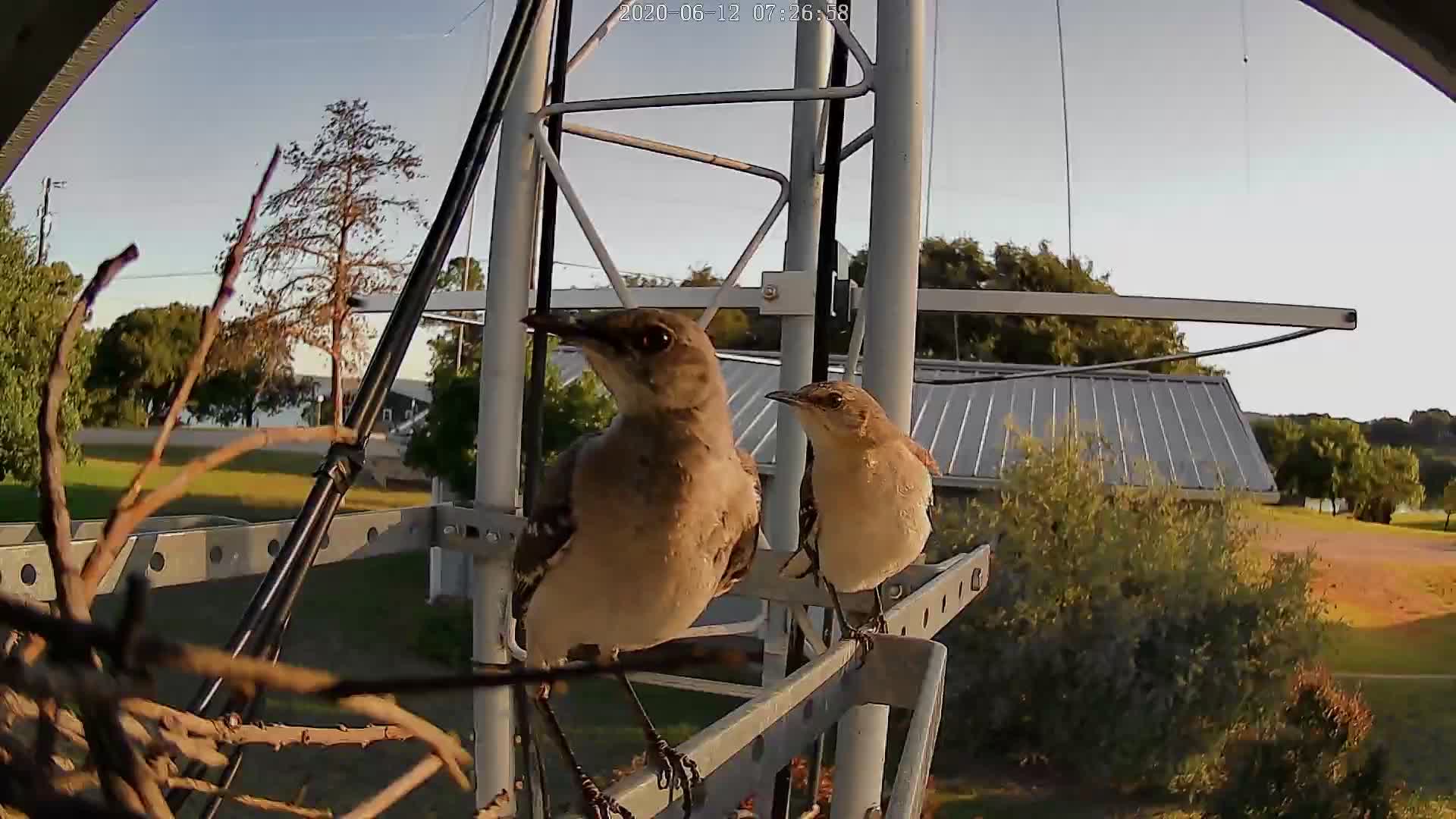
And below is another image from the rear.  Mom and Pop Mockingbird were building a nest between the Omni-Angle and the tower brace.  I can imagine them saying, "There goes the neighborhood!"

Dustin, much younger than WB5BKL, climbs for me.  Here is an image of him, several weeks later,  almost done with mounting the Omni-Angle at my designated height.  Dustin reported that there were three eggs in the mockingbird nest.  We tried not to disturb them.


So far, I am very pleased. I used my FA-VA-4 antenna analyzer to adjust resonance to 50.090 MHz at stepladder height and Dustin made very slight changes when it was up in the air.  (Note that the camera was tilted, not the tower.  😉)

I made a couple of contacts with the antenna at stepladder height and then had fun in the ARRL VHF - making 8 contacts in very casual operation with the antenna up in the clear.

At 5W of course.  QRP CW.

Now  I watch 6M for openings!


cln
WB5BKL


Sunday, August 6, 2017

Importing N1MM ADIF export files into XLog


I like the N1MM Contest Logger program for Amateur Radio contesting.

N1MM is quite amazing for free software and is very well maintained. It is aimed just at contesting and covers most of the major contests worldwide. It is easy to install and – though there is a steep learning curve – once set up, solid.

It supports exports to Cabrillo (.log) for contest log submissions and to the ADIF (.adi) format for import into other logging programs.

I prefer to use Linux on my computers. My 'Amateur Radio computer' is a dual-boot machine just so that I have access to the N1MM Contest Logger and an antenna modeling program – both available only on Windows. To the best of my knowledge there is no Linux equal for N1MM.

My everyday logging program is XLog – a Linux program. After each contest, I move the results into XLog. Unfortunately a direct import of the N1MM .adi file into XLog leaves a lot to be desired for me.

N1MM exports only the start time – to 6 places (hhmmss). I like both the QSO start and end times to be entered and 4 places (hhmm) is more common. I note that QSO start and end times in a contest are almost always identical.

N1MM exports the frequency to the nearest 0.1KHz. XLog's default is to the nearest Khz.

N1MM exports both a sent and a received signal report. In the weekly CWT contests I enjoy, neither report is exchanged but N1MM defaults to reports of 599 for both. I prefer that those false reports not be entered into XLog.

N1MM does export the contest exchange, but I like to include the name of the contest following the exchange in XLog.  XLog has a different name for this field.

Here is an example of one record from the N1MM exported .adi file. Note that this is all one line:

<CALL:4>K5OT <QSO_DATE:8>20170802 <TIME_ON:6>190518 <BAND:3>15M <STATION_CALLSIGN:6>WB5BKL <FREQ:8>21.03258 <CONTEST_ID:6>CW-Ops <FREQ_RX:8>21.03258 <MODE:2>CW <NAME:5>LARRY <RST_RCVD:3>599 <RST_SENT:3>599 <TX_PWR:1>5 <OPERATOR:6>WB5BKL <CQZ:1>4 <STX:1>2 <APP_N1MM_EXCHANGE1:3>127 <APP_N1MM_POINTS:1>1 <APP_N1MM_RADIO_NR:1>1 <APP_N1MM_CONTINENT:2>NA <APP_N1MM_RUN1RUN2:1>1 <APP_N1MM_RADIOINTERFACED:1>1 <APP_N1MM_ISORIGINAL:4>True <APP_N1MM_NETBIOSNAME:11>OPTIPLEX755 <APP_N1MM_ISRUNQSO:1>0 <EOR>

And here is what I would like the same line to look like for import into XLog:

<CALL:4>K5OT <QSO_DATE:8>20170802 <TIME_ON:4>190518 <TIME_OFF:4>190518 <BAND:3>15M <STATION_CALLSIGN:6>WB5BKL <FREQ:6>21.03258 <CONTEST_ID:6>CW-Ops <FREQ_RX:8>21.03258 <MODE:2>CW <NAME:5>LARRY <TX_PWR:1>5 <OPERATOR:6>WB5BKL <CQZ:1>4 <STX:1>2 <COMMENT:15>127 CWT-1900 <APP_N1MM_POINTS:1>1 <APP_N1MM_RADIO_NR:1>1 <APP_N1MM_CONTINENT:2>NA <APP_N1MM_RUN1RUN2:1>1 <APP_N1MM_RADIOINTERFACED:1>1 <APP_N1MM_ISORIGINAL:4>True <APP_N1MM_NETBIOSNAME:11>OPTIPLEX755 <APP_N1MM_ISRUNQSO:1>0 <EOR>

I have highlighted the areas that have been modified.

I did this with a little Bash script and the sed (Streaming EDitor) command. Below is the operational part of the sed command for one of the little contests I enjoy, the CWT at 1900Z each Wednesday:

# CWT1900.sed
#
#
s/\(<TIME_ON:6>\)\([0-9]*\)/<TIME_ON:4>\2 <TIME_OFF:4>\2/
#
s/<FREQ:8>/<FREQ:6>/
#
s/<FREQ:7>/<FREQ:5>/
#
s/ <RST_RCVD:3>599 <RST_SENT:3>599 / /
#
s/\(<APP_N1MM_EXCHANGE1\)\(:[0-9]*\)>\([A-Z0-9]*\)/<COMMENT:15>\3 CWT-1900/
#
#

This sed file makes the four changes I listed above. Now I can run the .adi output files from N1MM through my little bash script and import them into XLog with no editing needed!

If you would like copies of my bash script for the three CWT contests, with the accompanying sed files and some informal notes, email me at my QRZ.com address.


cln - Nick
WB5BKL